Introduction
In recent years, many people have used vibe coding, but the most common issue is not a lack of ability, but rather jumping straight into letting AI do the work, only to end up cleaning up the mess afterward. While this may seem like a time-saver, frequent changes in requirements lead to increasingly chaotic code, longer prompts, and growing frustration.
The problem lies not in the tool’s strength but in the sequence of operations. The true value of vibe coding is not in “writing everything at once” but in shortening the trial-and-error path, reducing cognitive load, and compressing the mental effort that would otherwise require constant switching.
To use vibe coding effectively, it’s crucial to establish a correct workflow: knowing when to let it diverge, when to converge, when to ask for explanations without action, and when to set firm boundaries. When the process is smooth, AI becomes an aid; when it’s chaotic, even the strongest model will amplify the confusion.
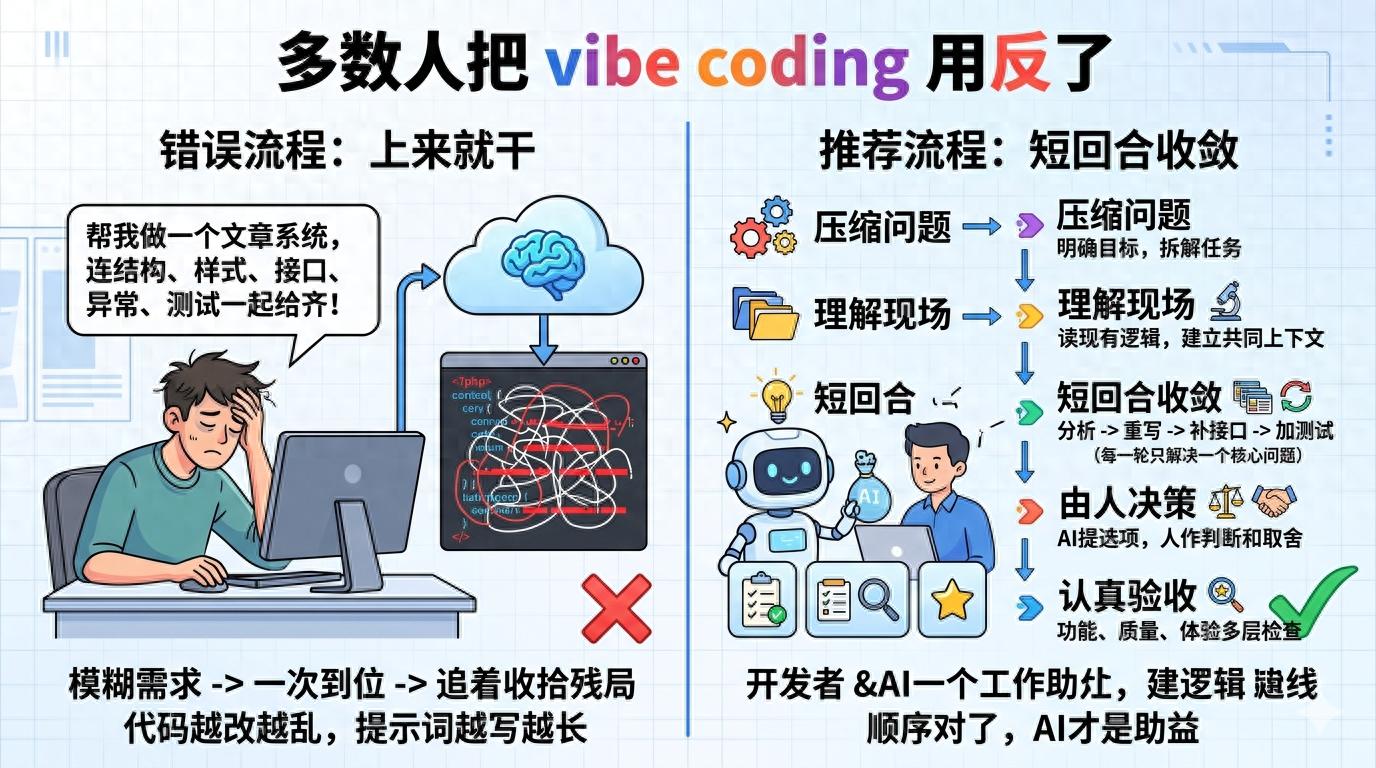
Step 1: Clarify the Problem Before Writing Code
Many people start with requests like: “Help me create a login page,” or “Help me write an admin backend.” While these sound like requirements, they are often poorly executable for AI because it doesn’t know whether you prioritize interaction speed, code maintainability, visual consistency, or simply getting the functionality running.
The first step in a correct process is usually not “generate code” but rather to compress the problem into a small, verifiable task. Instead of saying, “Help me create an article system,” break it down into tasks like, “Define the data structure and filtering criteria for the article list page,” or “Determine the interaction logic for saving drafts in the editor.”
This step is particularly valuable. AI’s biggest fear is not difficult problems but vague goals. When the goal is unclear, it can only default to filling in the blanks, often resulting in generic template-like responses. The need for rework arises not because it can’t write, but because the initial task boundaries were too loose.
I now prefer to have AI do two things first: 1) break down a vague requirement into 3 to 5 verifiable chunks; 2) clarify the input, output, and acceptance criteria for each chunk. This way, when I actually start writing, the rhythm is much steadier. You’re not betting on it getting everything right in one go; instead, you’re turning the entire task into several shorter rounds that are easier to get right.
Step 2: Let It Understand the Context First
Many people’s approach to using AI resembles pulling a new colleague into a workspace and saying, “Change this project.” The results are rarely good. Regardless of the model’s strength, it needs to understand the context first: what the current code structure is, what existing constraints exist, which areas can be modified, and which should not be touched.
Thus, the second step should be to let it read before writing. For example, you can first have it summarize the most relevant files in the current directory related to the requirement; have it explain the relationships between existing modules; or have it identify which areas might be affected by changing this functionality. The goal at this stage is not to produce code but to establish a shared context.
This step is akin to inspecting the structure before repairs. If you don’t clearly see whether the issue lies with the belt, the hot end, or the platform, and you just start adjusting parameters, you’re likely to go further off track. Writing code is the same. Many reworks stem not from implementation capability issues but from misaligned context, where AI diligently works in what it believes is a reasonable direction, resulting in outputs that are completely misaligned with your actual needs.
More realistically, understanding the context also helps you quickly determine whether the task is suitable for full delegation to AI. Some requirements are suitable for a one-shot approach, like independent components, scripts, or single-function pages; others are not, especially those heavily reliant on legacy logic, involving historical baggage, or with particularly vague boundaries. In such cases, the best use of AI is not to let it deliver directly but to have it assist in understanding, helping to lighten your load without replacing your judgment.
Step 3: Avoid Trying to Write Everything at Once
The most common pitfall in vibe coding is the desire to get everything done in one go. Many people pack multiple requirements into a single prompt, hoping AI will provide the structure, styles, interfaces, error handling, and tests all at once. While this may sound efficient, it is the easiest way to lose control over the results.
A truly effective process is to solve one core problem per round. For instance, first, have it set up the page skeleton; in the next round, focus only on state management; then handle interface errors and empty states; and finally, refine copy, tweak styles, and add tests. Each round should focus on one key point, significantly lowering the judgment cost.
This approach also has the crucial benefit of allowing for timely corrections. AI is not error-free; it often produces outputs that seem quite plausible even when incorrect. If you ask it to cover too much at once, errors can become deeply buried, and by the time you realize it, you may have already written hundreds of lines in the wrong direction. The purpose of short rounds is to help you catch deviations early and keep rework costs to a minimum.
My habit is to include a clear action verb in each round: analyze, rewrite, modify only, retain, do not touch, add tests, explain reasons. This way of prompting is far more effective than vaguely saying, “optimize it.” The term “optimize” is not clear enough for humans, let alone for the model. You need to let it know what the current round is about—whether it’s expanding, correcting, constraining, or reviewing.
Step 4: Place AI in Its Strongest Position, Not as Your Sole Decision-Maker
Many people’s expectations of vibe coding implicitly carry a dangerous premise: they hope AI will figure everything out on its own while they only need to approve. This mindset may seem pleasant in the short term but will almost inevitably lead to problems in the long run. The most challenging parts of software development are often not syntax or boilerplate code, but rather making trade-offs.
For example, whether to use a unified toast for interface error messages or inline prompts, whether configuration items should be explicit parameters or context injections, or whether to fix a function in place or refactor it—these decisions cannot be solved by “who writes better code” alone; they require consideration of project phase, team habits, deployment pressures, and future maintenance costs.
What role is AI best suited for in these areas? Not as a decision-maker but as a facilitator, helping you see options more quickly and understanding the costs of each option. You can ask it to list two or three implementation paths, compare their complexity, invasiveness, and risks, and then you decide which path to take. This is a more mature way to use AI.
In essence, vibe coding does not eliminate developers from the process; it liberates them from low-value repetitive tasks. What should remain in your hands are the judgments regarding goals, trade-offs, and final acceptance. As long as you retain control over these three aspects, it doesn’t matter whether AI writes a little more or a little less; it’s all manageable.
Step 5: Always Include an Acceptance Phase
This is the step that is most easily overlooked and has the greatest impact on results. Many people let AI generate code, see the page come up or the script run successfully, and think it’s good enough. However, when testing edge cases, a string of issues may arise: crashes with empty data, conflicts with legacy logic, styles breaking on mobile, and unreadable error messages.
Thus, in a correct process, acceptance is not an additional action but a core part of the workflow. You should conduct at least three layers of checks: the first layer is whether the functionality is achieved; the second layer checks if the existing logic has been disrupted; and the third layer assesses whether this code is something you can leave in the project. Many AI-generated codes may barely function but are chaotic in naming, divergent in structure, and repetitive; such code can provide short-term fixes but becomes a long-term liability.
A more stable approach is to involve AI in the acceptance process, but not to let it score itself; instead, have it review its own work. For example, ask it to check for unnecessary changes, potential edge issues, obvious repetitions, or violations of current project conventions. You’ll find that AI is often more reliable at “reviewing its own writing” than when it generated it initially.
If conditions allow, it’s best to combine local execution, testing, manual clicks, and key path reviews. Because while the model can understand code logic, it doesn’t mean it can perceive the real user experience. Especially for front-end and interactive tasks, that final manual verification often catches many issues where the code is correct, but the product experience is wrong.
Conclusion
I increasingly believe that the real difference in vibe coding lies not in who can write better prompts but in who recognizes that it is fundamentally a process capability. The context you provide, how you break down tasks, how you control rounds, and how you conduct acceptance checks will lead to vastly different outcomes.
If you treat it as an automatic code-writing machine, you will be disappointed over time; if you treat it as a highly responsive collaborator that still needs your guidance, it will become smoother to use. Many people do not struggle with using AI; they are simply too eager to relinquish their decision-making power, only to find themselves having to return to clean up the aftermath.
The truly effective process is not flashy: first, clarify the problem, then align the context, followed by short rounds of convergence, keeping decision-making power in your hands, and finally conducting thorough acceptance checks. When the sequence is correct, vibe coding is not just a trendy new toy but a method that can genuinely integrate into workflows, saving you time and reducing rework.
Comments
Discussion is powered by Giscus (GitHub Discussions). Add
repo,repoID,category, andcategoryIDunder[params.comments.giscus]inhugo.tomlusing the values from the Giscus setup tool.